Commercial structured cabling
Structured cabling and network cabling in San Diego
Cat6, Cat6a and fiber infrastructure for commercial buildings across San Diego County — designed to standard, installed by a C-7 Low Voltage licensed contractor, labelled, documented and certified on every link. New construction, retrofit and take-over of cabling somebody else left behind.
Structured Cabling
The part of the building nobody sees, and every system depends on
Structured cabling is a standardised cabling system for a whole building, designed as one architecture instead of being assembled one cable at a time as each new requirement appears. Every outlet runs back to a common point, which sounds like an administrative detail and is actually the decision that sets what the next ten years cost you.
The practical consequence is that the cabling stops being tied to whatever device prompted it. Any outlet can serve any system — a workstation today, a camera, a wireless access point or a door controller later — without a new cable pull through an occupied building. Sites that grew the other way end up with a ceiling full of single-purpose runs nobody documented, and every subsequent project pays for that twice: once to trace it and once to work around it.
There is no single correct category for a building. Cat6, Cat6a and fiber get assigned run by run, against what that run has to carry and for how long, not chosen once for the whole site. Pathways matter as much as the cable and are the single largest variable in what a security project costs later.
A link light is not a test. Certification against the standard, with results you keep, is what tells you a run will still perform when something demanding is put on it. We label, document and certify, and we work under CSLB C-7 for low voltage. If the cabling is going in for cameras or access control, surveying both at once avoids paying for the same ceiling twice.
That is with us. We will come back to arrange a survey. If it is urgent, call (858) 222-7547.
- CSLB C-7 #976737
- BSIS ACO #7501
- CMMC certified
- SAM.gov registered
- Est. 2008
The explainer
What is structured cabling?
Structured cabling is a standardised cabling system for an entire building, designed as one architecture instead of being assembled one cable at a time. Every outlet is cabled back to a communications room on its floor; those rooms are linked to a main room by backbone cable; the whole thing is built to published TIA/EIA standards, labelled to a documented scheme, and tested link by link on completion.
The practical consequence is that the cabling stops being tied to whatever device prompted it. Any outlet can serve any system — a workstation today, a camera, a wireless access point or a door reader next year — because the change happens at a patch panel, and not at the end of a ladder. A building cabled this way absorbs churn; a building cabled point-to-point resists it.
The standard divides the system into parts, and the vocabulary is worth knowing because every quote you receive will use it:
- Work area. The outlet at the desk, the camera or the reader, and the patch cord connecting the device to it.
- Horizontal cabling. The permanent run from that outlet back to the floor's communications room. This is the bulk of the cable in any building and the part that is expensive to change later.
- Telecommunications room. The IDF — the floor or zone room where horizontal cabling terminates on patch panels in a rack.
- Backbone cabling. The runs between those rooms and the main room, and between buildings. Usually fiber.
- Entrance facility and equipment room. The MDF, where the carrier's service lands and the core equipment lives.
Pathways are also the single largest variable in what a security project costs, which is covered on what drives commercial security system cost. None of this is exotic. What separates a system that behaves from one that does not is almost never the brand of cable — it is whether the pathways, the labelling, the termination practice and the test records were treated as part of the job or as paperwork to skip.
What a certifying test measures
A marginal link passes a continuity check and then fails in hot weather
A certifying test measures the electrical behaviour of the link: wire map and polarity, length, insertion loss, near-end and far-end crosstalk, and return loss, each judged against the limit for that category and length. A verification test — the continuity check most people picture — confirms the pairs are connected in the right order and nothing more.
A slightly untwisted pair at the termination, or a run fractionally over length, will pass verification and then drop packets under load, throttle a camera stream, or fail intermittently in hot weather. Those faults are close to impossible to diagnose afterwards from the symptom.
The PoE budget that fails the same way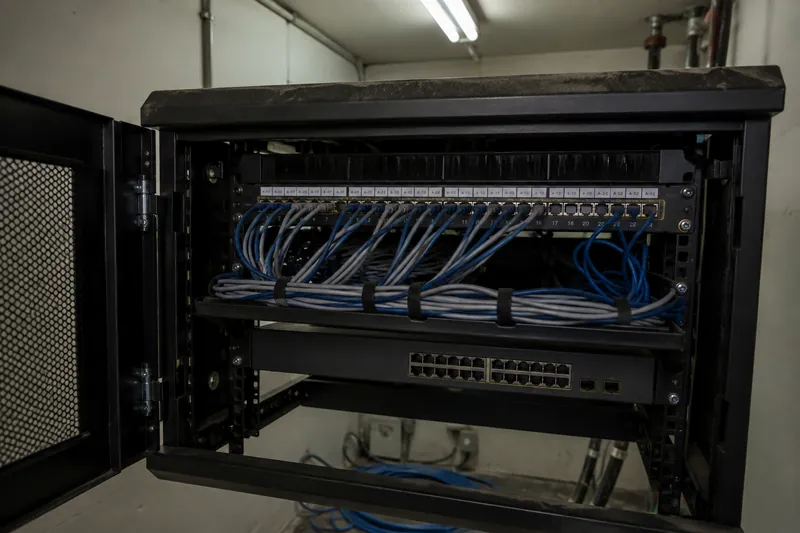
Media
Cat6, Cat6a and fiber — chosen per run
Cat6
Appropriate for general workstation and voice outlets, and still the majority of drops in a typical office. It supports Gigabit comfortably and 10 Gigabit over short distances. Where a building is cabled for desks and phones and nothing more demanding, Cat6 is not a compromise.
Cat6a
The sensible default wherever a run will carry higher-power PoE — a camera with a heater and IR illuminator, a wireless access point, a door controller. Its heavier construction and separator handle the heat those loads generate inside a bundle, and it supports 10 Gigabit across the full 100 metre channel. On new commercial work it is increasingly the standard for everything, on the reasoning that the labour to pull a cable dwarfs the difference in the cable itself.
Fiber backbone
Between floors, between buildings and anywhere copper's distance limit or an electrical separation makes copper the wrong choice. Single-mode for campus and inter-building runs, multimode where the distances are short and the optics cheaper. Fiber also removes the grounding problem that copper creates between separately served structures.
Coax and legacy media
Many San Diego commercial buildings still run coax to camera positions and it is often perfectly serviceable. We will tell you when it is worth keeping, when it can carry an IP system over an adapter, and when it has become the reason a system cannot be upgraded.
Distance limits
The standard permits a 100 metre channel for copper — about 328 feet — including patch cords at both ends, so the permanent link is limited to roughly 90 metres. Runs near that limit are the most common cause of a link failing certification, and they are resolved at design with an intermediate room or a fiber leg. The cable run length checker tests a proposed run against that channel, patch cords included.
Power over Ethernet
Modern devices draw meaningful power over the same cable that carries their data, and that power becomes heat inside a full conduit or a tightly cinched bundle. PoE budget, bundle size and pathway fill are design decisions, not afterthoughts — the failure they cause is intermittent and surfaces long after the installer has left.
MDF, IDF and racks
The rooms everything terminates in
A cabling system is judged in its communications rooms. Everything else is buried in walls and ceilings, but the MDF and the IDFs are where the quality of the work is visible, and where every future change either takes twenty minutes or takes a day.
The main distribution frame is where the carrier service lands and the core switching lives. Intermediate distribution frames serve floors or zones, so that horizontal runs stay inside their distance limit — which is what determines how many you need and where they go. In a multi-floor building the IDFs are stacked and linked by a fiber riser; across a campus each building gets its own, linked back on single-mode fiber.
A rack build-out we would sign off includes:
- Patch panels ordered to match the labelling scheme, so port 14 on the panel is outlet 14 on the plan and not a cable somebody found.
- Horizontal and vertical cable management, with patch cords in the management, not draped across the panels.
- Service loops left in the ceiling and at the rack, so a panel can be moved later without repulling the run.
- Bonding and grounding of racks and pathways to the building's grounding system — a code requirement and a real protection for the equipment.
- Clean power and UPS provision, with enough runtime for the switching that keeps cameras and door controllers alive through a short outage.
- Ventilation and heat management appropriate to what is in the rack; a sealed closet with a full rack is a heat problem waiting to become an outage.
- Abandoned cable removed, and not coiled and left, which is both a code matter and the main reason later work in a building becomes expensive.
A link light is not a test
Every permanent link we install is tested with a certifying tester — a Fluke-class instrument or equivalent — against the standard for the category installed. That is a materially different exercise from checking that a device comes online.
Two different jobs with the same standard
New construction
Cabling is designed alongside the building rather than fitted into it. Pathways, sleeves and communications rooms are coordinated with the other trades before walls close, rough-in happens on the construction schedule, and termination and testing follow at trim. The advantage is that the pathway is designed for the building, not negotiated with it — and the coordination window is short, so being late is expensive for everyone.
Retrofit and occupied buildings
The majority of commercial cabling work. The survey establishes what is actually above the ceiling as opposed to what the drawings claim, routes are found through existing construction, and cutovers are staged so the operation keeps running. Work in clinical, secure or trading areas is scheduled around the occupant instead of the other way round.
Multi-floor buildings
Stacked IDFs linked by a fiber riser, sized so no horizontal run approaches its distance limit. Riser penetrations are firestopped to the listed detail — a life-safety requirement that gets missed more often than any other item in this trade.
Multi-building and campus
Single-mode fiber between structures, with the electrical separation that copper between separately grounded buildings cannot safely provide. Underground routes, handholes and slack are planned for the second cable you will want later, not only the first.
Moves, adds and changes
The ongoing work: new outlets, reconfigured floors, additional drops for cameras or access points. On a documented system these are quick. On an undocumented one they start with tracing, which is why the first job in a building we take over is often a survey and a label scheme.
Take-over and remediation
Existing cabling nobody has records for: surveyed, tested, labelled and documented, with a straight account of what should be remediated and what is fine as installed. Abandoned cable is identified for removal, and not left to accumulate.
Where we work
Commercial sites across San Diego County
Offices and multi-tenant
Dense workstation cabling, wireless coverage, and tenant fit-outs that change on lease cycles. Multi-tenant buildings need the boundary between landlord backbone and tenant horizontal settled before design.
Warehouses and distribution
Long spans, high ceilings and racking that blocks wireless. Distance limits bite here more than anywhere, so IDF placement — not cable category — is the design decision that matters.
Medical and dental
Infection-control constraints on ceiling work, scheduling around clinical use, and cabling supporting systems that carry patient data. Pathway and penetration discipline is scrutinised closely here.
Government and defence-adjacent
Documented pathways, separation requirements between networks, and equipment provenance rules. Where procurement policy applies we can confirm whether specified hardware meets NDAA §889 requirements.
Manufacturing and industrial
Environments where dust, washdown, vibration or EMI from plant would destroy cabling specified for an office. Media and pathway are chosen for the environment, and routes are kept clear of the obvious noise sources.
Education and multifamily
Distributed buildings on one campus, cabling in occupied residential or teaching space, and infrastructure that has to serve cameras, access control and wireless from the same rooms.
Labelling and documentation
The part that decides what the next ten years cost
Labelling is the least glamorous part of a cabling job and the one with the longest financial tail. An unlabelled system is not a documentation problem — it is a system where every subsequent change begins with a technician tracing cables by hand, billed by the hour, in your ceiling.
The standard covering this is ANSI/TIA-606, and what it asks for is consistency, not any particular format: every outlet, every cable, every panel port, every room and every pathway carries a unique identifier, the identifier at both ends of a cable agrees, and there is a record tying the identifier to its location. Labels are printed and mechanically applied, not handwritten on tape that falls off in a warm ceiling within a year.
Handover documentation includes:
- Floor plans marking every outlet with its identifier.
- Rack elevations showing what is installed where, and which panel serves which zone.
- A port-to-outlet schedule — the record that turns a patching request into a two-minute job.
- Certified test results for every permanent link, identified by label.
- Photographs of pathways and penetrations before ceilings close, which is the only chance anyone gets to see them.
This documentation is yours. You should not have to call the installer to find out what your own building is wired with, and you should never be in the position — common in buildings we take over — where the only person who understood the system has left.
Cabling is what the security systems actually depend on
Most of the faults we are called out to on camera and access systems are not faults in the camera or the reader. They are infrastructure faults — a marginal termination, a run over distance, a PoE budget exceeded, water in an external junction — presenting as an equipment problem. Replacing the device does not fix any of them, which is why a system can be "repaired" three times and still fail. The power one is the least obvious of those and has its own write-up: the PoE power budget.
- Cameras. Every IP camera is a PoE device on a data drop, and image quality, frame rate and reliability all sit downstream of the cable. Existing systems misbehaving this way are covered under CCTV maintenance and repair.
- Access control. Readers, controllers and locking hardware need both data and power routed to every door, and the door positions are usually the hardest pathways in the building. See commercial access control.
- Alarm and intrusion. Panels, sensors and communicators depend on the same low voltage infrastructure, cabled under the same C-7 scope. See commercial alarm monitoring for the monitored side.
- Wireless and everything else. Access points, IP intercoms, paging, displays and PoE lighting all land on the same structured system — which is the argument for cabling a building once, properly, not per system as each is bought.
Where cabling and security are installed by the same contractor under one licence, nobody is left arguing about whose problem an intermittent fault is. That is the practical case for having the two done together, and it is the reason this page exists alongside the security pages instead of as a separate business.
Survey, design, install, certify, document
Every job starts with a survey of the actual building. Drop counts quoted over the phone are guesses, because the cost of a cabling job is decided by pathway and distance, not by the number of outlets.
- Survey. Existing infrastructure, available pathways, communications room locations and condition, and the real distances involved.
- Design. Media per run, IDF placement so nothing approaches the distance limit, pathway and fill, PoE budget, and the labelling scheme — agreed before anything is pulled.
- Rough-in. Pathways, sleeves and cable pulled to the plan, with service loops left at both ends and penetrations firestopped as they are made, not at the end.
- Termination. Outlets, patch panels and fiber terminated to standard, with the twist maintained to the termination point — the detail that most often separates a passing link from a marginal one.
- Certification. Every permanent link tested to the standard for its category, with failures corrected and retested, and not noted.
- Documentation and handover. Plans, rack elevations, the port-to-outlet schedule and the full test record, handed over as yours.
Where the cabling is feeding cameras, access control or alarm systems, the same visit commissions those too, under the same licences — C-7 for the cabling, ACO #7501 for the monitored and access-controlled parts.
What handover includes
Where the price difference usually is
Where a link fails, it is corrected and retested, not recorded as a known issue. The complete set of results, per link, identified by label, is part of handover — not an extra.
If a cabling quote you are comparing does not mention certified testing, that is where the price difference usually is.
What we find on systems we take over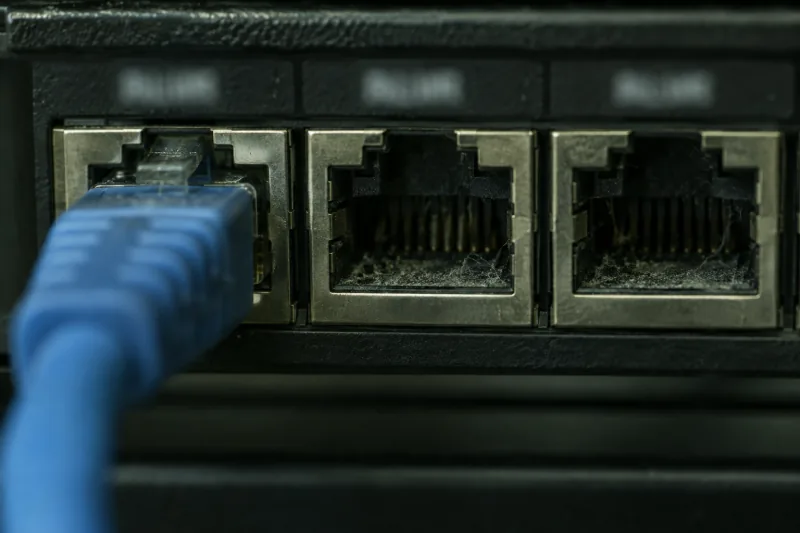
Common questions
Structured cabling questions
Structured cabling is a standardised cabling system for a building, designed as one architecture, not assembled one cable at a time. Instead of running a dedicated cable from each device back to whatever equipment it happens to serve, every outlet in the building is cabled back to a floor communications room, and those rooms are linked to a main room by backbone cable. Everything is built to published TIA/EIA standards, labelled to a documented scheme, and tested on completion. The result is that any outlet can serve any system — a workstation today, a camera or a door reader next year — by patching it at the rack, not by pulling new cable.
Point-to-point cabling solves the immediate problem and creates the next one. It has no consistent pathway, no labelling scheme, no documentation and usually no test results, so every later change means tracing cables by hand to find out what they do. Structured cabling front-loads that work: fixed pathways, a documented labelling scheme, consistent termination practice and a certified test record for every link. The install costs more up front and costs dramatically less every time the building changes, which for a commercial site is continuously.
Usually a combination, chosen per role. Cat6 remains appropriate for general workstation and voice outlets. Cat6a is the sensible default where a run will carry higher-power PoE devices — cameras with heaters and illuminators, wireless access points, door controllers — because its construction handles the heat those loads generate in a bundle, and it supports 10 Gigabit to the full 100 metre channel. Fiber is for backbone: between floors, between buildings, and anywhere the distance exceeds copper limits or the path crosses between separately grounded structures. What matters more than the category is that the choice is made per run against what that run has to carry.
The TIA/EIA standard permits a 100 metre channel for copper — approximately 328 feet — and that figure includes the patch cords at both ends, not just the cable in the wall. The practical limit for the permanent link is therefore around 90 metres, and the real-world distance is shorter again once pathway routing, vertical drops and slack are accounted for. Sites that exceed it need either a fiber backbone to an intermediate communications room or a repositioned rack. Where a run is close to the limit, this is the single most common reason a link fails certification later, so it is resolved at design, and not discovered at test.
Yes. Every permanent link is tested with a certifying tester — a Fluke-class instrument or equivalent — which measures the electrical characteristics of the link against the standard, not simply confirming that a signal reaches the far end. Wire map, length, insertion loss, crosstalk and return loss all have to pass. That is different from a continuity or a "link light" check, which will happily pass a marginal cable that then drops packets under load. You get the test results as part of handover documentation, per link, identified by its label.
Yes, and most commercial cabling work is retrofit instead of new construction. Working in an occupied building changes the sequence, not the standard: pathways are surveyed against what is actually above the ceiling instead of what the drawings claim, cutovers are staged so the existing network keeps running, and work in patient areas, secure areas or trading floors is scheduled around the operation. What we will not do is quietly leave abandoned cable in the ceiling — accumulated dead cable is both a code issue and the reason later work in that building gets expensive.
Yes. San Diego CCTV Pros holds CSLB #976737, a C-7 Low Voltage Systems contractor's licence — the licence California requires for communication and low voltage cabling work — and a BSIS Alarm Company Operator licence (ACO #7501) for the alarm and access-control systems that cabling feeds. Look either number up with the agency that issued it. Fire alarm work is not ours, because a C-10 or a C-16 is what that takes and we hold neither; where cabling crosses fire-rated construction, the penetrations are firestopped to the listed detail and coordinated with the AHJ and your fire contractor.
Yes. A large share of what we do begins as an existing system nobody has documentation for. The starting point is a survey: what is installed, where it terminates, what is live, what is abandoned, and which links still pass a test. From that you get a labelled, documented record of your own infrastructure — frequently the first one the building has had — and a straight account of what should be remediated versus what is fine as installed.
Related services
Other commercial services
Access Control Systems
Card, fob and mobile credential systems — readers, controllers, electric locking hardware, and integration with the camera system.
Biometric Access Control
Fingerprint, facial and palm credentials for the commercial openings where a credential must not be transferable — server rooms, cash handling, controlled inventory and pedestrian gates. Installed under ACO #7501, with the template storage and retention questions settled at design.
CCTV Maintenance & Repair
Scheduled preventive maintenance contracts and on-call repair for commercial camera systems — including systems we did not install. Camera replacement, cabling faults, NVR and storage failures, firmware and retention audits.
Commercial Alarm Monitoring
Central-station monitoring for commercial intrusion alarms — panels, contacts, motion and glassbreak detection, video verification against the camera system, and takeover of an existing panel. Intrusion only.